Category: IT

  • Hybrid Cloud vs. Multi-Cloud: Understanding the Differences and Choosing the Right Strategy
    Hybrid Cloud vs. Multi-Cloud: Understanding the Differences and Choosing the Right Strategy

    Hybrid Cloud vs. Multi-Cloud: Understanding the Differences and Choosing the Right Strategy

    Cloud computing has changed how businesses manage their IT infrastructure. From storing business data to running enterprise applications, organizations now have several options for hosting their workloads. However, choosing the right cloud environment can be challenging, especially when deciding between hybrid cloud and multi-cloud strategies.

    Although these terms are sometimes used interchangeably, they represent different approaches to managing cloud infrastructure. Understanding the differences can help businesses make better technology decisions.

    What Is Hybrid Cloud?

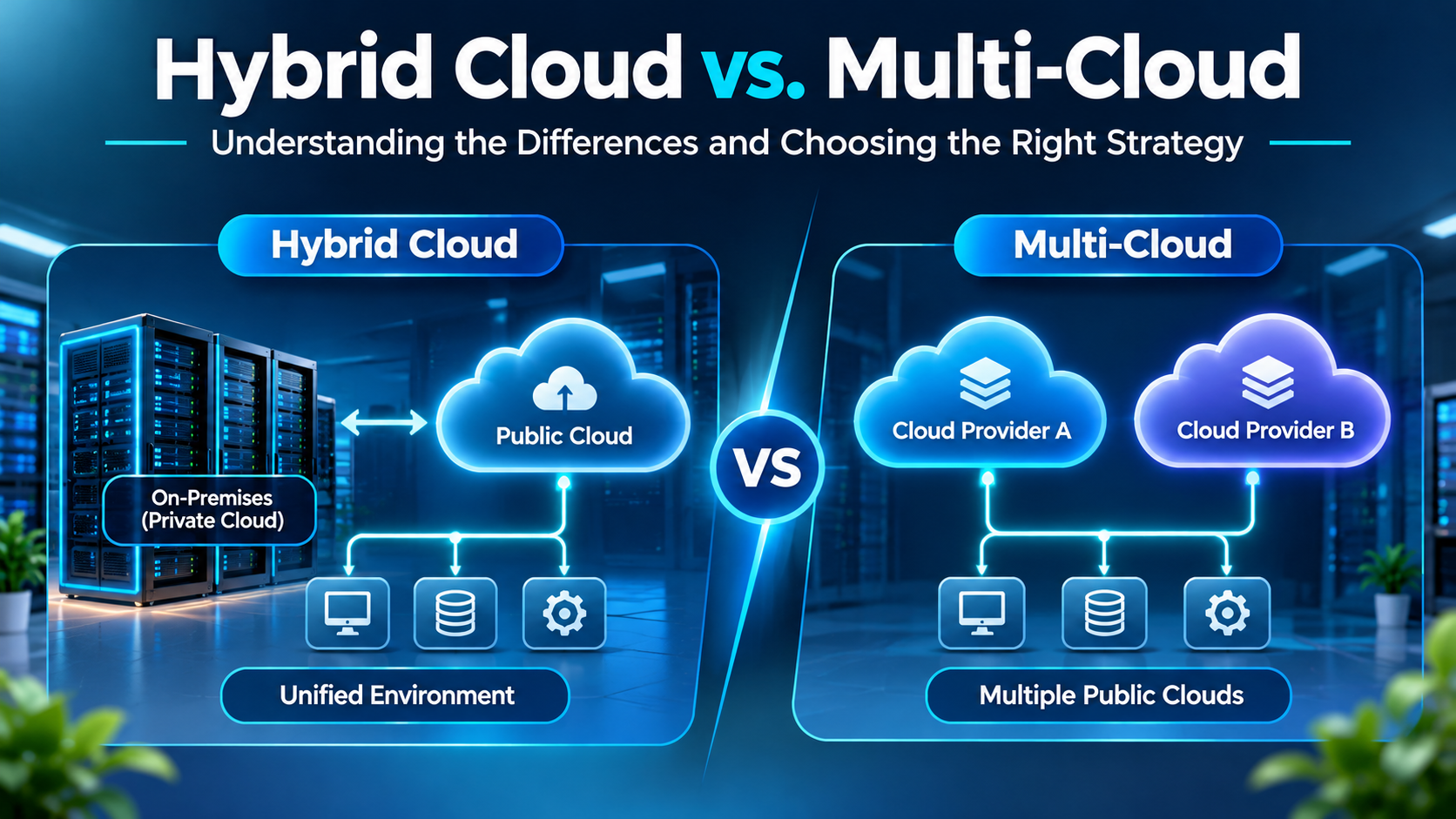
    A hybrid cloud combines private infrastructure, such as an organization’s own data center or private cloud, with one or more public cloud services.

    This approach allows businesses to keep sensitive information and critical applications in controlled environments while using public cloud platforms for additional computing capacity and scalability.

    For example, a financial organization might maintain sensitive customer records in its private infrastructure while using AWS or Microsoft Azure to support applications that require additional computing resources.

    Key benefits of hybrid cloud:

    • Greater control over sensitive business data.
    • Flexibility to manage workloads across environments.
    • Support for existing IT infrastructure.
    • Easier scalability through public cloud resources.

    What Is Multi-Cloud?

    A multi-cloud strategy involves using cloud services from two or more different cloud providers. Instead of depending on a single provider, businesses distribute applications and workloads across platforms based on their requirements.

    For example, an enterprise might use AWS for application hosting, Microsoft Azure for enterprise services and Google Cloud for specific data and analytics workloads.

    This approach allows organizations to select services that best match their technical and business needs.

    Key benefits of multi-cloud:

    • Reduced dependency on a single cloud provider.
    • Access to different providers’ specialized services.
    • Greater flexibility in selecting cloud solutions.
    • Additional options for business continuity and resilience.

    Hybrid Cloud vs. Multi-Cloud: Key Differences

    The main difference lies in how infrastructure is distributed. Hybrid cloud connects private infrastructure with public cloud services, whereas multi-cloud uses services from multiple cloud providers.

    Hybrid cloud is generally useful for businesses that need greater control over their infrastructure, while multi-cloud is suitable for organizations seeking flexibility across different cloud platforms.

    However, both approaches introduce management challenges. Businesses must consider security, data integration, operational complexity and the skills required to manage multiple environments.

    How Should Businesses Choose the Right Strategy?

    The right approach depends on business requirements rather than technology trends.

    Organizations with sensitive data, existing data centers or specific compliance requirements may benefit from hybrid cloud. Businesses looking for provider flexibility, specialized cloud services or reduced dependence on one vendor may consider multi-cloud.

    Some enterprises may even combine both approaches, creating a hybrid multi-cloud environment.

    Before making a decision, businesses should evaluate their infrastructure, security requirements, operational budgets and long-term technology goals.

    Conclusion

    Hybrid cloud and multi-cloud strategies offer different advantages for modern enterprises. While hybrid cloud focuses on combining private and public infrastructure, multi-cloud focuses on using services from multiple cloud providers.

    There is no universal solution for every organization. The best strategy is the one that supports business requirements, maintains security and delivers the right balance of flexibility, performance and cost.
  • Cloud Cost Optimization: How Enterprises Can Reduce Infrastructure Spending

    Cloud Cost Optimization: How Enterprises Can Reduce Infrastructure Spending

    Cloud Cost Optimization: How Enterprises Can Reduce Infrastructure Spending

    Cloud computing has made it easier for businesses to manage applications, store data and scale their operations without investing heavily in physical infrastructure. However, as cloud usage grows, so do the expenses. Many organizations move to the cloud expecting lower IT costs, only to discover that unused resources, oversized servers and unnecessary storage can quickly increase their monthly bills.

    This is where cloud cost optimization becomes important. It helps businesses get more value from their cloud investments while keeping infrastructure spending under control.

    Why Are Cloud Costs Increasing?

    Cloud expenses do not always come from increased business activity. Sometimes, they result from resources that are not being used efficiently.

    For example, a company might continue paying for virtual machines that are no longer required or maintain high-capacity servers even when application traffic is low.

    Other common reasons include:

    • Unused or idle cloud resources.
    • Overprovisioned computing capacity.
    • Unnecessary data storage and backups.
    • High data transfer charges.
    • Lack of regular cost monitoring.

    Without proper visibility, these expenses can go unnoticed for months.

    Practical Ways to Reduce Cloud Infrastructure Costs

    Businesses do not necessarily need to move away from their existing cloud platforms to control spending. A few improvements can make a meaningful difference.

    1. Monitor Cloud Usage Regularly

    Use cloud cost management tools to understand where money is being spent. Services such as AWS Cost Explorer, Azure Cost Management and Google Cloud Billing help businesses track expenses and identify unusual spending.

    2. Remove Unused Resources

    Review virtual machines, storage volumes, testing environments and other resources regularly. Removing infrastructure that is no longer needed can prevent unnecessary charges.

    3. Choose the Right Resource Size

    Not every application needs high computing capacity. Adjusting server configurations according to actual workload requirements can reduce costs without affecting performance.

    4. Automate Resource Scaling

    Application traffic changes throughout the day. Auto-scaling helps businesses increase resources when demand rises and reduce them when demand falls.

    5. Optimize Cloud Storage

    Not all business data needs expensive, high-performance storage. Moving older or rarely accessed data to more economical storage tiers can help reduce storage expenses.

    How FinOps Helps Businesses Manage Cloud Spending

    Cloud cost management is not just an IT team’s responsibility. Finance, engineering and operations teams also need visibility into infrastructure expenses.

    This is where FinOps comes in. It brings these teams together to monitor cloud spending, manage budgets and make better decisions about resource usage.

    With a structured FinOps approach, businesses can understand where their money goes and ensure that cloud investments support actual business requirements.

    Conclusion

    Cloud cost management is not just an IT team’s responsibility. Finance, engineering and operations teams also need visibility into infrastructure expenses.

    This is where FinOps comes in. It brings these teams together to monitor cloud spending, manage budgets and make better decisions about resource usage.

    With a structured FinOps approach, businesses can understand where their money goes and ensure that cloud investments support actual business requirements.